It was my third time attending a Czech UX barcamp. Just like in 2023 and 2024, I enjoyed its laid-back atmosphere – meeting old friends, making new ones, exploring various topics, sharing thoughts with like-minded people, and sitting around the cracking fire, listening to folks singing and the occasional sound of a breaking glass… I had a great time!
In case you missed it, I took a few notes.
AI as a therapist
Danca welcomes AI as a supportive tool in therapy:
- more consistent than a human therapist
- always available
- remembers more
- inexpensive to choose one out of many available based on a situation
However, an AI therapist isn’t always suitable. For example, severe trauma should be treated by a human therapist.
On the other hand, AI can make life easier by offering advice on resolving family issues, improving communication and providing coaching.
Never use a general AI chat as a therapist. It lacks any guiderails and could be dangerous!
An AI therapist uses carefully crafted, personalized prompts tailored to you and your family. With even a little context about your family, it can offer highly relevant advice.
Agentic systems
Chemix‘s advise is to dedicate time at your company to try it out with your developers, download agents from the marketplace and learn how they work, create a safe environment for experimentation to reduce risk, integrate it with your infrastructure (ex. Slack), and document best practices so that agent can leverage it.
Agents first plan their work and then start generating a solution in which they differ from a AI chats that start responding immediately.
Agents can be instructed to use a particular tool via MCP to guide their approach. By telling AI agents both what to do and what not to do, we create boundaries that shape and constrain their solutions.
Prototypes generated by agents can be tested with users to validate the concept.
Claude Code runs in the terminal, costs $20 per month and has an extension for Visual Studio.
n8n and Roo Code (open source) are worth trying out as well.
Measuring impact of design in B2B
Klara shared her challenge of defining metrics to measure the impact of her design team’s work on the business, in a situation where the end user isn’t involved in the decision-making process and the user experience isn’t relevant to the integrators installing the product.
How can the value of the design team’s work be measured and communicated to C-level executives in such a case?
We discussed various approaches, ranging from measuring reduction in support calls related to the UI, to cost savings from features that weren’t developed thanks to insights from UX research.
0% Figma, 100% design
Honza presented 12 competencies for today’s designers:
- Selecting a suitable design process for a project
- Speaking the language of a business: knowledge of frameworks (ex. Theory of Constraints) and spreadsheets
- Facilitating meetings and workshops to reach a desired outcome
- Interviewing users to extract as many and truthful insights as possible (Research)
- Making sense of research data as early (ex. Affinity Mapping, K-J Method)
- Making difficult strategic decisions based on research data, intuition and strategic frameworks (ex. Business Moats) before making any plans.
- Managing stakeholders by building relationships (ex. Listening, Negotiation, Presentation, Resilience, Influence…)
- Generating multiple ideas using (un)structured ideation techniques either alone or in a group
- Rapidly prototyping static or dynamic, small or complex prototypes using AI tools
- Testing prototypes with users (ex. Pitch Provocations, Fake Door Test)
- Increasing the efficiency of design operations (ex. Automation, Deep Research)
- Managing projects for timely delivery of work
Based on seniority, designers should focus on:
- Junior: 4. Research, 8. Ideation, 9. Rapid prototyping
- Medior: 2. Business language, 3. Facilitation, 10. Testing business ideas
- Senior: 5. Sense-making, 6. Strategy, 7. Stakeholder management
Foundation sprint
Tomas explained how he used this two-day workshop to align stakeholders before the project. Without it, goals and expectations might have been misaligned, leading to a prolonged and painful project with gradually declining motivation.
Day 1 – align on:
- Customer and key customer problem
- Unique advantage
- Competition
Day 2:
- Come up with ideas
- Evaluate them on different scales
- Pick a top bet
- Formulate hypothesis
Top bet should be in the top right quadrant on different scales:

Team can run a design sprint to test the hypothesis.
Online focus group
Jan showed us Nautie, a tool for qualitative research.
With it, you can create a discussion and invite participants via email. Once inside, participants respond in a written form to questions. After answering, they can view others’ responses, like them, and add comments.
The moderator can continue adding more questions as the discussion evolves. Everything happens asynchronously, requiring only occasional input from the moderator. Each participant and snippets of their answers can be labeled to categorize and extract insights.
Jan advised recruiting a diverse group rather than a homogeneous one to spark more interesting discussions. Participants can be recruited through newsletters, offered a reward, and filtered using a recruitment survey.
Nautie can also be used to test prototypes. The discussion description can simply contain instructions on how to use a prototype, followed by questions to gather feedback.
ADHD
Matej‘s talk explained the effects of attention deficit hyperactivity disorder (ADHD) on neurotransmitters in the brain, its hereditary nature and symptoms.
In the past, it was inaccurately classified as a childhood disorder. Over time, many people learn to compensate for ADHD in their daily lives, which can make it seem as though adults are no longer affected.
Onboarding designers
Pavel prepared an interactive session focused on designer onboarding.
Newcomers often don’t know what they don’t know – so they need a clear map to guide them.
A sense of ownership is key: when newcomers feel responsible for their onboarding, they’re more motivated to complete tasks.
Pavel proposed an onboarding kanban board where each card contains a task, the necessary information, and a contact person for support. Newcomers can edit the board themselves, reinforcing the sense of ownership.
How do we measure onboarding success? It’s simple: if we tell newcomers where the dining hall is and ask them to eat lunch there, success means they can actually do it.
Onboarding ideas:
- Meeting people from other teams
- Playful onboarding
- Shadowing
- Clarifying responsibilities
Keyboard accessibility
Michaela and Lukas teamed up to share tips on how to check websites for keyboard accessibility, with practical examples. Just press a tab on your keyboard and try it out.
A website should be fully usable without a mouse, since many people with disabilities rely on a keyboard or devices that emulate one.
Focus clearly visible
❌No:

✔Yes:

Nested menus excluded from focus order
❌No (must tab through everything in the menu):
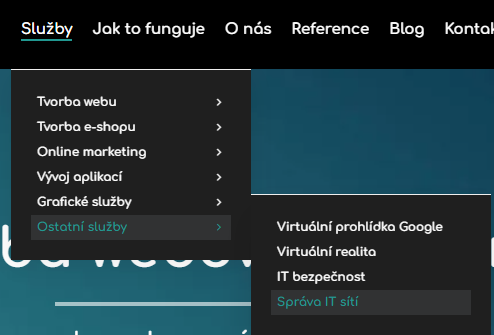
Escape closes nested menu
❌No (escape does nothing):
Skip link available
✔Yes (upon pressing tab for the first time):

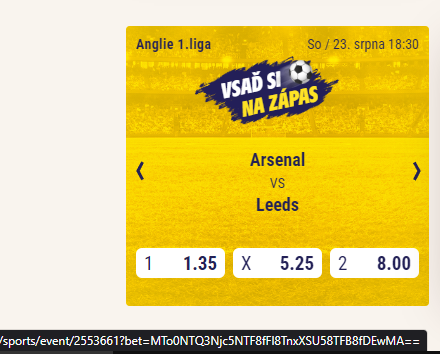
No focus traps
❌No (forced to tab through every sport event inside the card):
Clear focus order
❌No (input fields don’t follow logical focus order):
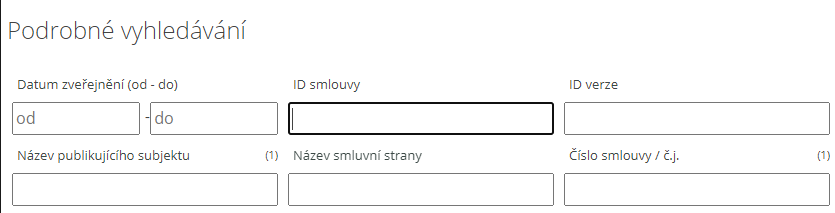
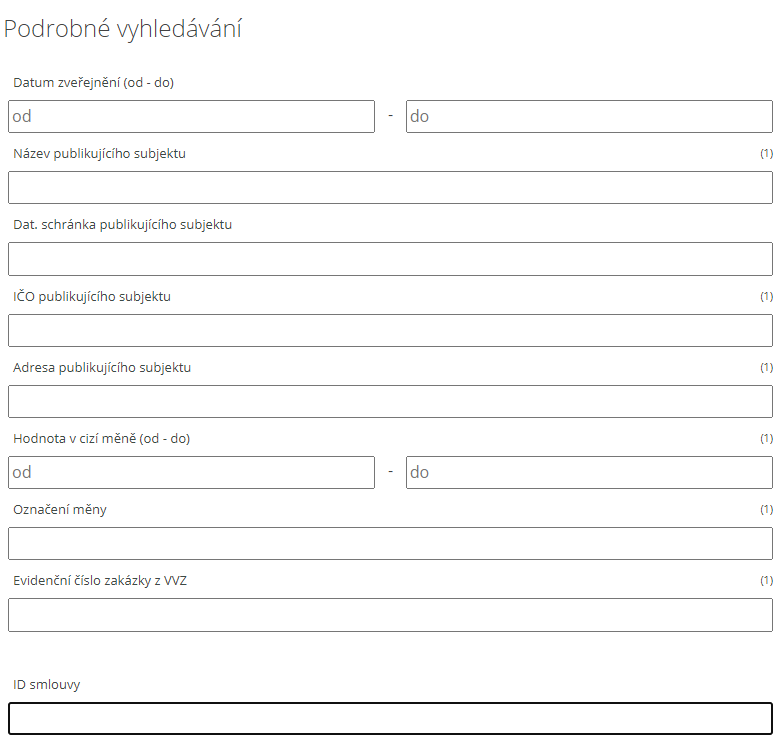
Although “ID smlouvy” should be the third field, the column-based layout pushes it down to 11th in the tab sequence. As a result, users are forced to jump back and forth between columns when navigating with the keyboard.
All elements reachable
Every element must be reachable with a tab key, ensuring that people who cannot use a mouse can interact with the entire site.